
Master Precision In Every Swing

Stop guessing, start mastering. Achieve your perfect rhythm through scientific analysis.

As Seen In

AI Golf Swing Analyzer

Precision Data & AI-Powered Coaching: Master Your Swing with Real-Time Feedback

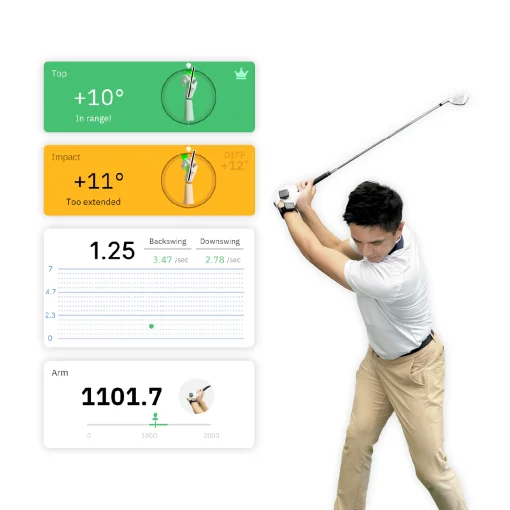
Utilizing high-precision sensors and AI-powered analysis, SwingMotion captures real-time data on wrist angles, body posture, tempo, and swing speed. We transform complex biomechanics into clear, actionable training insights.
Whether on the range or the course, SwingMotion helps you pinpoint flaws and make instant adjustments. Designed for everyone from beginners to touring professionals, our system provides a structured path to enhance precision, stability, and consistency—making your progress visible with every swing.

Master Every Move with Precision Data Analysis

Stop Guessing on the Range. Gain Scientific Clarity on Every Swing.

Live 3D Avatar Rendering

Visualize your golf swing instantly with a real-time 3D avatar. SwingMotion turns motion data into a high-fidelity 3D model, allowing golfers to spot posture and movement issues immediately and make quick, precise adjustments to improve performance

Visualize Your Swing in Real Time, Fix It Faster

Replay your swing step by step to closely inspect each movement. Detailed playback helps identify inefficiencies, timing issues, and technical flaws, making swing analysis more accurate and improvement more effective.

Break Down Every Swing with Precision

Frame-by-Frame Action Playback

A clear, intuitive color-coded system makes swing analysis easy to understand:


Step-by-step data analysis highlights exactly where to focus, guiding golfers toward measurable progress and more consistent results.

Pinpoint Your Swing Flaws. Get Instant Fixes.

Color-Coded Performance Insights

Understand Your Swing Quality at a Glance

Green: Movement is within the optimal range

Yellow: Indicates areas that need improvement

Versatile Data Analysis

Key Metrics That Actually Improve Your Swing

Access comprehensive performance indicators—including angle changes, rhythm, swing speed, and more—to gain deeper insights into your mechanics. Use data-driven feedback to refine technique and elevate overall swing performance.

AI Tips – AI-Powered Coaching

Pinpoint Flaws with Actionable Instant Fixes

SwingMotion’s AI Tips analyzes your swing in real time and delivers personalized, visual, and actionable coaching advice. Instantly understand what’s wrong, how to fix it, and how to improve—without relying on feel alone.

Pinpoint Your Swing Flaws. Get Instant Fixes.

Training History & Management

Track Your Progress and Master Your Evolution

Automatically archive every swing session to visualize your long-term growth. Use historical data to identify trends, review past performances, and refine your training strategy. Turn your practice history into a roadmap for continuous improvement.

Drill Mode

Focus on Detail, Build Muscle Memory

Designed for precision. Beyond full swing analysis, our modular drills provide targeted data to help you fix technical flaws and achieve a more stable, powerful swing.

Drill: Wrist Trackig

Real-time monitoring of wrist rotation and angle deviation—the core factors in controlling ball direction. Use instant data feedback to correct flaws, establish a consistent swing path, and elevate your overall precision and control.

Drill: Torso Movement

Precisely track changes in forward and side tilt to maintain a stable spine angle throughout your swing. Avoid “thin” or “fat” shots caused by inconsistent posture, ensuring a smoother rhythm and more solid, accurate impact.

Drill: Hip Movement

Analyze hip rotation and lateral tilt in real-time to correct excessive sway or balance issues. Strengthen your kinetic chain through scientific data, turning your lower body into a rock-solid foundation for explosive power and consistent results.

Drill: Wrist Tracking

Master the Angle, Eliminate Slices & Hooks

Real-time monitoring of wrist rotation and angle deviation—the core factors in controlling ball direction. Use instant data feedback to correct flaws, establish a consistent swing path, and elevate your overall precision and control.

Drill: Torso Movement

Stabilize Your Axis for Pure Contact

Precisely track changes in forward and side tilt to maintain a stable spine angle throughout your swing. Avoid “thin” or “fat” shots caused by inconsistent posture, ensuring a smoother rhythm and more solid, accurate impact.

Drill: Hip Movement

Optimize Weight Transfer for Maximum Power

Analyze hip rotation and lateral tilt in real-time to correct excessive sway or balance issues. Strengthen your kinetic chain through scientific data, turning your lower body into a rock-solid foundation for explosive power and consistent results.

Training Modules

Science-Driven Progress for Peak Performance

Master every detail with our four specialized modules. SwingMotion helps you identify technical flaws and transform proper form into lasting muscle memory.

Wrist Tracking

Wrist Control – Square the Face, Eliminate Directional Misses

Module
Monitor and adjust your wrist angles in real-time to stabilize face control and shot direction. Effectively reduce Slices and Hooks caused by excessive rotation or angle deviations. Establish a consistent swing foundation to significantly boost your accuracy and confidence on the tee.

Torso Movement

Module

Torso Dynamics – Stabilize Your Axis, Optimize Power Transfer

Precisely track Spine Angle and chest rotation to maintain a stable axis throughout your swing. Correct imbalances caused by excessive lateral tilt or restricted rotation, ensuring a smoother rhythm and maximizing the transfer of clubhead speed and impact force.

Hip Movement

Module

Track lower-body rotation and pelvic weight transfer to build a rock-solid base. Prevent inconsistencies caused by over-rotation or excessive sway, ensuring every swing delivers explosive power and a crisp, solid feel at impact.

Pelvic Rotation – Strengthen Your Foundation for Stable Output

Body Separation – X-Factor

Dynamic Coordination – Unleash the X-Factor for Maximum Distance

Module

Designed for advanced players to master the separation between upper and lower body movements. By optimizing your Kinetic Chain and X-Factor stretch, you can dramatically increase swing speed and carry distance while eliminating energy loss from poor coordination.

Why Choose SwingMotion?

Move beyond video-based guesswork. Experience the precision of high-fidelity 9-axis motion sensing.

Key Features & Benefits

Brand H (Partial Sensor)

SwingMotion

Brand S (Imaging AI)

Recommended by Top Golf Coaches

Ted Britschgi​

Magazine Top 250 Instructor
  • Director of Instruction, Colorado
  • Magazine Top 250 Instructor
  • Golf Digest Top Instructor in State
  • Former Director of David Leadbetter Academies

Coque Insua

Founder of GOLF Q Coach
  • Founder of GOLF Q COACH; Head Pro at T Golf Calvià & T Golf Palma.
  • 15+ years of experience running golf academies at all levels.
  • Teaching 300+ students online regularly.
  • Built a community of 120K+ followers on social media.
  • Focused on tech‑driven, clear swing coaching.

Guido Caneo

Fonder of CaneoGolf Academy
  • Pga instructor based in Rome, Italy
  • Tour Pro, Elite and NCAA Players coach and consultant worldwide
  • 25+ years experience coaching on course and online
  • Fonder of CaneoGolf Academy

Joe DiChiara

Founder of Combine Golf Academy
  • Over 20 years of coaching experience; founder of Combine Golf Academy
  • Coached PGA, LPGA, and LIV Tour players, including Padraig Harrington and Chan Kim
  • Helped 50+ juniors earn NCAA golf scholarships in the U.S. and Thailand
  • Consultant and Education Director in golf technology and coach development

Ben Pellicani

Director of Golf Lipscomb Academy
  • Golf Digest Best in State since 2016
  • 2023 Tennessee PGA Section Teacher of the Year
  • Director of Golf Lipscomb Academy
  • Lead Instructor Westhaven GC

Kevin Sprecher

GOLF Magazine Top 100
  • GOLF Magazine Top 100
  • 2018 Met Section Teacher of the Year
  • Golf Digest Best in NY

Jayson Nickol

Level 1 ground force certified with PGA Coach Steve Furlonger
  • Level 1 ground force certified with PGA Coach Steve Furlonger, TPI Level 1, Golf Level 2, and Swing Catalyst Level 1.
  • Mentored by world-renowned coach Shauheen Nakhjavani (Top 75 globally).
  • Invictus Games medalist, now coaching from his private studio in Winnipeg, Canada.

Megan Johnston​

Golf Digest Best Young Teacher
  • LPGA Class A Member
  • Golf Digest Best Young Teacher
  • LPGA Southeast Teacher of The Year
  • Director of Instruction at Big Cedar Resort, Branson, MO

Jake Thurm

Golf Digest’s Best Young Teachers in America.
  • Golf Digest’s “Best Young Teachers in America” for three consecutive years.
  • Experience includes over 200 PGA Tour events, with close to 30 majors, and appearances as a Golf Channel expert commentator.
  • Midwest Director for the USA Junior National Golf Team, Director of Nike Junior Golf Camp at Links & Tees, operates golf schools at Ruffled Feathers Golf Club, and Master Staff at Club Champion, Willowbrook.

Ryan Robillard

PGA of Canada Coach and Head Coach at Elevate Performance Golf, Windsor, Ontario.
  • PGA of Canada Coach and Head Coach at Elevate Performance Golf, Windsor, Ontario.
  • 7,000+ hours of coaching experience and 500+ hours of professional development, working with golfers of all levels.
  • Achievements: 5 provincial titles, 20+ collegiate golfers, and PGA of Ontario Teacher of the Year.
  • Certifications include TPI Power & Junior Level 3, S2M Biomechanics, BioSwing Dynamics, and more.


Package Contents

  • 2 Sensors
  • 1 USB Type-C Charging Cable
  • 2 Clips
  • 1 Palm Strap
  • 1 Wrist Strap
  • 1 Waist Belt
  • 1 Vest

SwingMotion APP

Sensor Specifications

Accuracy
±2°
Sensor
9-axis sensor (3-axis accelerometer, 3-axis angular velocity, 3-axis magnetometer)
Acceleration measurement range
±16 g
Angular velocity measurement range
±2,000 dps
Data output rate
100 Hz
Wireless transmission frequency
2.4 GHz
Wireless transmission method
802.15.1
RF output power
0 dBm
Latency (Delay)
<20ms
Communication distance
10 m (interference-free environment)
Operating temperature
32℉ – 104℉ (0 – 40℃)
Dimensions
1.46 x 1.46 x 0.39 inches (37 x 37 x10 mm) Height × Width × Thickness
Weight
0.46 ounces (13 grams)
Power supply
Built-in Li-Polymer battery
Battery capacity
120 mAh
Operating current
0.1 A
Usage time
Maximum about 4.5 hours (continuous motion capture time)
Charging time
about 2 hours
Charging port
Type-C

Where to Buy

United States
Europe
Japan
Singapore

Frequently Asked Questions

Can’t find what you’re looking for? Send us an email at sales@moxisens.com

Account Creation and Login
How to Register an Account
  1. Enter your email in the App and press the “Continue” button.
  2. Press the “Get Verification Code” button to receive the code.
  3. Check your email, enter the verification code in the app, and set your password.
  4. Press the “Continue” button to confirm.
How to log in
Enter your account and password, then press the login button
What to do if you forget your password
  1. Press the “Forgot Password” button.
  2. Press the “Get Verification Code” button to receive the code.
  3. Check your email and enter the verification code in the App.
  4. Press the “Continue” button.
  5. Set your new password and confirm.
Account exists or does not exist message
During registration, the system will notify you if the account already exists. If the account does not exist, please follow the registration steps to create an account.
Preferred hand setting (right-handed or left-handed)
If you are right-handed (right-handed, holding a pen or chopsticks with your right hand), the APP will be set to your right hand and the sensor will be placed on your left hand. If you are left-handed, the APP will be set to your left hand and the sensor will be placed on your right hand.
Sensor Firmware Update and Calibration
How to update the sensor software
  1. Connect the sensor to the power charger using the included USB Type C cable
  2. Enter the sensor software update page in the App
  3. Follow the App instructions to update
  4. During the update process, the sensor will display the charging status
How to perform calibration?
The system uses geomagnetic information to enhance the accuracy of motion sensing. It is recommended to calibrate the device during the first use, when using across countries, or when the device’s location changes.
Find the calibration option in the app and follow the instructions to complete the process.
Errors and Troubleshooting
What to do if an error occurs during initialization?
Reselect the training module you want to use and follow the on-screen instructions to reinitialize.
Usage Information
Precautions for using wrist control, upper body movement, pelvic movement, and upper-lower body coordination training modules
Please first ensure the correct wearing position and light direction. Stand up straight and place the palm flat against the outer side of the thigh. If the initialization result is unsatisfactory, check the wearing position and posture.
How to check training data?
In the training module, scrolling up and down will reveal functional buttons. Click to view more detailed data. Scrolling down will display additional analytical data. Once the data is saved, you can exit the training.
What is precision mode?
Precision mode requires users to place the sensors exactly as instructed, and the hand and body posture during initialization must be very precise to achieve expert-level accuracy. Even a slight deviation in the wearing position or failure to properly perform the initialization movement can result in ‘Normal’ or ‘Poor’ accuracy messages during product initialization. For most users, the standard mode is sufficient to meet the expert-level accuracy requirements.
Wearing Position
Where should the MOXI sensors be worn?
The MOXI sensors can be worn on different parts of the body such as the wrist, palm, upper back, and lower back, depending on the training module being used.
  1. For the wrist tracking module, attach the MOXI sensor to the wristband and wear it on the non-dominant wrist.
  2. For the Torso movement module, insert the MOXI sensor to the vest, ensuring the arrows on the vest align with the MOXI logo, with the center of the vest positioned on your back’s center. Wear the second MOXI sensor on the non-dominant wrist.
  3. For the Hip movement module, clip the MOXI sensor to the waistband, ensuring the sensor is centered on your lower back. The second MOXI sensor should be worn on the non-dominant wrist.
  4. For the Body separation module, clip the MOXI sensor to the vest, aligning the arrows and MOXI logo, with the vest center positioned on your back’s center. The second MOXI sensor should be clipped to the waistband, ensuring it is centered on your lower back.
Sensor Information
Indicator light meanings
  1. White solid light: On, BT not connected.
  2. Light blue solid light: Connected, but training mode not selected.
  3. Red solid light: Charging.
  4. Red flashing light (on for 0.1 seconds, off for 2 seconds): Low battery (20%).
  5. Flashing light according to the set position (on for 0.2 seconds, off for 1 second): Data transmission in progress.
How long can the sensor be used continuously?
Approximately 4.5 hours
How long does it take to charge?
2 hours
What is the battery capacity?
120 mAh
What is the power consumption?
0.1 Ampere
What type of charging interface does the sensor use?

USB Type-C

Bluetooth Connection Information
Sensor connection range
10 meters
Temperature range for sensor usage
0 – 40℃
Where is the sensor's MAC address located?
The MAC address of each sensor is printed on the back of the sensor. Each sensor has a different MAC address.
Bluetooth Connection Issues
Sensor/Device not found
Please make sure the Bluetooth of your smartphone and sensor ares both turned on
Bluetooth cannot pair or connect
  1. When connecting via Bluetooth, please ensure the sensor device is connected through the SwingMotion app, not directly from the phone’s Bluetooth settings.
  2. For Android mobile devices, please ensure that ‘Use Location’ is enabled in Settings -> Location.
  3. For Android mobile devices, when the App requests location and precise location access, it’s required to grant permission.
  4. If a ‘Permission Denied’ error appears, check whether the system Bluetooth is enabled and ensure that the app has been granted the correct Bluetooth permissions as mentioned above.
Others
Accessory Selection/Choosing Golf Gloves: Please avoid products containing iron or magnets
Please avoid using golf gloves with magnetic closures, as the magnets on the closures may affect the accuracy of the sensors.
How long is the warranty?
Electronic components including sensor related ICs are under warranty for one year, except for batteries and straps, which are consumables and are not covered by the warranty.
Network Connection
Is an internet connection required for use?
When you create an account and log in for the first time, you need to have an Internet connection.
Can it be used offline?
The App can be used offline. However, uploading training/usage data to the cloud requires an internet connection.
Scroll to Top